
UiPath-ABAv1 Pre-Exam Practice Tests | (Updated 173 Questions)
Valid UiPath-ABAv1 Exam Q&A PDF - One Year Free Update
NEW QUESTION # 29
In UiPath Automation Hub, what factor is taken into consideration when determining the degree of effort required to successfully automate a process?
- A. Process variability
- B. Process department
- C. Process owner
- D. Browser type
Answer: A
Explanation:
In UiPath Automation Hub, the factor that is taken into consideration when determining the degree of effort required to successfully automate a process is process variability. High variability in a process can complicate automation efforts, requiring more sophisticated solutions and more extensive testing and adaptation.References: UiPath Documentation on Automation Hub athttps://docs.uipath.com/.
NEW QUESTION # 30
When starting a project with UiPath Process Mining, you can leverage already created applications to shorten the delivery time of a project. What are three out-of-the-box app templates available in UiPath Process Mining repository that you can deploy for a project?
- A. Purchase-to-Pay for any source system, Warehouse Management for SAP, Mortgage Loans for Oracle Cloud
- B. Purchase-to-Pay for SAP, Order-to-Cash for Oracle JDE, Lead-to-Order for Salesforce
- C. Incident Management for Service Now, TemplateOne-SingleFile for any source system, Mortgage Loans for Oracle Cloud
- D. Lead Management for Salesforce Pardot, Data Warehouse for SAP, Incident Management for ServiceNow
Answer: B
Explanation:
UiPath Process Mining provides a variety of out-of-the-box app templates that can be used as a starting point for creating process applications. These templates are designed to work with specific source systems and can be customized to fit business needs. The templates include a set of dashboards and KPIs to enable business users to monitor and analyze the processes in detail. The correct options from the given choices are:
* Purchase-to-Pay for SAP: This app template is designed for the SAP source system and can be extracted using Theobald Xtract Universal1.
* Order-to-Cash for Oracle JDE: This template is suitable for the Oracle JDE source system and uses CData Sync for data extraction1.
* Lead-to-Order for Salesforce: This app template is tailored for the Salesforce source system and also relies on CData Sync for data extraction1.
These templates are part of the process-specific app templates for specific source systems available in the UiPath Process Mining repository.
NEW QUESTION # 31
Which is the most effective way for a Business Analyst to document business exception handling for an automation process?
- A. By checking the application logs and creating an exception-handling scenario based on them.
- B. By creating a diagram showcasing the steps involved in handling each type of exception.
- C. By writing a detailed description of each business exception and the action that should be taken.
- D. By recording the business users while handling the exceptions.
Answer: C
Explanation:
For documenting business exception handling effectively:
Detailed Description: Writing a detailed description is the most effective way as it ensures clarity and comprehensiveness for the development team. It includes:
A clear definition of the exception type.
The conditions under which it occurs.
The steps or actions to resolve the exception.
Standardized Format: Business Analysts often use the Process Definition Document (PDD) to document exceptions. This ensures alignment with other process documentation and facilitates smooth handover to developers.
Supporting Evidence: While diagrams (option C) and application logs (option B) may provide supplementary information, they are not sufficient on their own to convey the full handling strategy. A descriptive approach ensures every stakeholder understands the handling steps.
NEW QUESTION # 32
How can you improve the accuracy of information extracted using UiPath Document Understanding ML Extractor?
- A. By providing a visual interface for manually verifying extracted information
- B. By using machine learning model algorithms to improve extraction accuracy over time, provided that the ML model is retrainable
- C. By providing a central repository for storing and organizing documents
- D. By allowing users to create custom extraction rules
Answer: B
Explanation:
To improve the accuracy of information extracted using UiPath Document Understanding ML Extractor, you can use machine learning model algorithms to improve extraction accuracy over time, provided that the ML model is retrainable. This approach allows the system to learn from corrections and variations, progressively enhancing its accuracy and reliability in data extraction.
UiPath Documentation on Document Understanding ML Extractor at https://docs.uipath.com/.
NEW QUESTION # 33
Can you define custom variables in Insights for calculating specific KPIs?
- A. Yes, they are extracted from trigger parameters.
- B. Yes, they are extracted from robot logs and queues.
- C. No, as Insights is not customizable besides the generic templates.
- D. No, we cannot use custom variables.
Answer: B
Explanation:
Understanding Custom Variables in UiPath Insights:
UiPath Insights allows users to define and utilize custom variables for calculating unique KPIs tailored to their business needs. These variables are primarily extracted from logs generated by robots and queues, providing insights into process performance.
Why Option C is Correct:
Custom variables in Insights are derived from data sources like robot logs and queues, enabling businesses to track and measure KPIs aligned with their automation goals.
Why Other Options Are Incorrect:
Option A: Insights does support custom variables, making this incorrect.
Option B: Trigger parameters are not the primary source for extracting custom variables.
Option D: Insights offers customization beyond generic templates, allowing for tailored KPI calculations.
NEW QUESTION # 34
What is the purpose of the Test Scenarios Document'?
- A. When using Agile methodology
- B. When applications are very complicated
- C. For thorough testing of each workflow specifications
- D. For regression testing
Answer: C
Explanation:
The purpose of the 'Test Scenarios Document' is to provide a structured approach for thorough testing of each workflow specification. It outlines various use case scenarios that guide users through creating and executing test cases, particularly in complex integrations such as with SAP Solution Manager. This document ensures that all aspects of a workflow are tested comprehensively, covering different parameters and variants, to validate that the software performs as expected and meets the requirements1.
References: The use and importance of the Test Scenarios Document are detailed in the UiPath Documentation Portal, specifically in the section "Use Case Scenarios" under the Test Suite documentation1.
NEW QUESTION # 35
In the context of UiPath selectors, what is an anchor?
- A. An image in the application window that identifies the element, for example an icon or a button
- B. An anchor is a nearby element that helps to uniquely identify the target element.
- C. An XML fragment that stores the attributes of an element and its parent elements, including the target application
- D. A selector that takes into account possible changes in the attributes of an element, identifying them based on a pattern, rather than on an exact match
Answer: B
Explanation:
In UiPath, an anchor is used in conjunction with selectors to improve the accuracy of identifying UI elements within an application. When a selector is not reliable due to dynamic content or changing layouts, an anchor-a stable element nearby the target-can be used to pinpoint the target element with greater precision.
The anchor serves as a point of reference, and the relative position of the target element to this anchor is used to identify it during automation tasks1.
References: The explanation is based on the UiPath Documentation Portal's definition of anchors in the context of selectors21.
NEW QUESTION # 36
In UiPath Automation Hub, what factor is taken into consideration when determining the degree of effort required to successfully automate a process?
- A. Process variability
- B. Process department
- C. Process owner
- D. Browser type
Answer: A
Explanation:
In UiPath Automation Hub, the factor that is taken into consideration when determining the degree of effort required to successfully automate a process is process variability. High variability in a process can complicate automation efforts, requiring more sophisticated solutions and more extensive testing and adaptation.
Reference: UiPath Documentation on Automation Hub at https://docs.uipath.com/.
NEW QUESTION # 37
What kind of document is a contract?
- A. Semi-structured
- B. Unstructured
- C. Hybrid-structured
- D. Structured
Answer: A
Explanation:
A contract typically has consistent components (like parties involved, terms, and signatures) but the actual content varies, making it semi-structured.
UiPath Document Understanding defines semi-structured documents as:
"Documents that contain a mix of structured information (e.g., field labels) and unstructured text (e.g., clauses and paragraphs)." Contracts fit this description perfectly.
References:
UiPath Document Understanding documentation: Document Types
UiPath Academy: Document Understanding modules
NEW QUESTION # 38
Which of the following best describes the differences between an "as is" process map and a "to be" process map in the context of RPA (Robotic Process Automation)?
- A. An "as is" process map shows the current state of a process, while a "to be" process map shows the desired future state of the process
- B. An "as is" process map is used for manual processes, while a "to be" process map is used for automated processes
- C. An "as is" process map shows the steps in a process, while a "to be" process map shows the inputs and outputs for each step
- D. An "as is" process map is used for data analysis, while a "to be" process map is used for process optimization
Answer: A
Explanation:
The differences between an "as is" process map and a "to be" process map in the context of RPA are that an
"as is" process map shows the current state of a process, while a "to be" process map shows the desired future state of the process after automation has been implemented. This distinction is fundamental as it guides the transformation from manual to automated processes by highlighting necessary changes and enhancements.References: UiPath Documentation on Process Mapping athttps://docs.uipath.com/.
NEW QUESTION # 39
In the context of UiPath selectors, what is an anchor?
- A. An image in the application window that identifies the element, for example an icon or a button
- B. An anchor is a nearby element that helps to uniquely identify the target element.
- C. An XML fragment that stores the attributes of an element and its parent elements, including the target application
- D. A selector that takes into account possible changes in the attributes of an element, identifying them based on a pattern, rather than on an exact match
Answer: B
Explanation:
In UiPath, an anchor is used in conjunction with selectors to improve the accuracy of identifying UI elements within an application. When a selector is not reliable due to dynamic content or changing layouts, an anchor- a stable element nearby the target-can be used to pinpoint the target element with greater precision. The anchor serves as a point of reference, and the relative position of the target element to this anchor is used to identify it during automation tasks1.
References: The explanation is based on the UiPath Documentation Portal's definition of anchors in the context of selectors21.
NEW QUESTION # 40
Who should be involved in the UAT phase?
- A. Process Owner. RPA Developer, Business Analyst and Support Team
- B. Support Team, Solution Architect, Business Analyst and Process Owner
- C. RPA Developer, Solution Architect, and Client Business Team
- D. Business Analyst. Process Owner, and Subject Matter Expert
Answer: D
Explanation:
During the User Acceptance Testing (UAT) phase, the individuals who should be involved include the Business Analyst, Process Owner, and Subject Matter Expert. This group ensures that the automation meets business requirements, is technically accurate, and adheres to operational needs, which are critical for validating the solution before full deployment.
UiPath Documentation on UAT at https://docs.uipath.com/.
NEW QUESTION # 41
In the context of the Robotic Enterprise Framework, what do we call a transaction?
- A. The minimum (atomic) amount of data and the necessary steps required to process the data.
- B. A single step in the to-be business process that needs to be automated.
- C. An activity used in the Studio project to interact with a UI Element in the target application.
- D. A single workflow in the automation project.
Answer: A
Explanation:
Definition of a Transaction:
In the Robotic Enterprise Framework (REFramework), a transaction refers to the smallest unit of data or activity processed as part of a larger workflow.
Example: An invoice, a customer order, or a line item in a document.
Option Analysis:
Option A (Correct): A transaction is the atomic data unit (e.g., an invoice entry) along with the steps required to process it.
Option B: Refers to activities interacting with UI elements, which is not the definition of a transaction.
Option C: A single step in the process does not encapsulate the full transaction processing context.
Option D: A workflow can process multiple transactions, not just one.
Relevance in REFramework:
The REFramework uses queues in UiPath Orchestrator to manage and process transactions efficiently.
NEW QUESTION # 42
What should be done when the process documentation is missing?
- A. Look at every possible impact that might be generated by accepting the change
- B. Create a checklist to ensure the documentation is accurate and consistent
- C. Identify the right SMEs and decision makers in order to gather the necessary information
- D. Increase the time dedicated for process development
Answer: C
Explanation:
When the process documentation is missing, it is crucial to identify the right Subject Matter Experts (SMEs) and decision-makers in order to gather the necessary information. This approach ensures that accurate, comprehensive, and relevant data about the process are collected to create or update the missing documentation effectively.References: UiPath Documentation on Process Documentation at
https://docs.uipath.com/.
NEW QUESTION # 43
Based on the image, when should you choose the Build Trace option?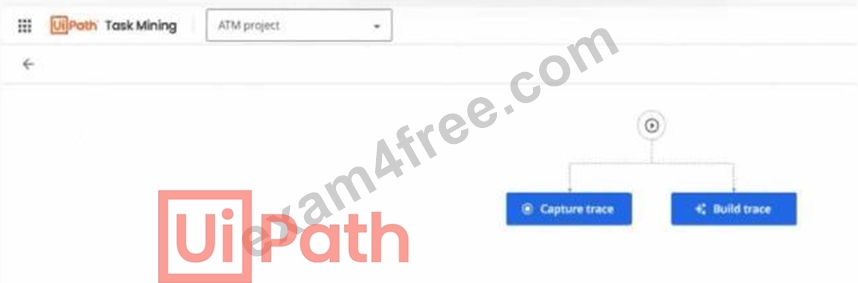
- A. You want to automatically record the task with the recording client.
- B. You know the high-level process overview and you want to create the trace graph first and then fill it in with the captured actions.
- C. To capture the actions of the task as you perform it and let Assisted Task Mining create the trace diagram automatically.
- D. The task environment can be set up for task completion and recording.
Answer: B
Explanation:
In UiPath Task Mining, there are two primary ways to create the trace of a process:
# Capture Trace: Used when you want to automatically capture user actions in real-time during the execution of the task, letting UiPath Task Mining automatically create the trace diagram.
# Build Trace: Used when you have a high-level understanding of the process, and you want to manually define the process trace first (as a skeleton) before filling in with real data or captured actions.
From UiPath documentation:
"Build Trace allows you to manually define the sequence of process steps when you have an overview of the process. It's typically used for scenarios where the process can be modeled first, and the details can be added later." References:
UiPath Task Mining documentation: Capturing and Building Traces
UiPath Academy: Task Mining modules
NEW QUESTION # 44
How can you allocate licenses in the Automation Cloud?
- A. Pair allocation only, the license is assigned to the user and bound to a selected group
- B. Only group allocation, the user have to assign the license to themself afterwards
- C. Direct assignment to user, Group allocation
- D. Only direct allocation to user, having the option to group the users in the tenant
Answer: C
Explanation:
In the Automation Cloud, licenses can be allocated either by direct assignment to a user or by group allocation.
This flexibility allows administrators to efficiently manage and distribute licenses based on organizational needs and user roles, ensuring that resources are optimized across the tenant.References: UiPath Documentation on License Management in Automation Cloud athttps://docs.uipath.com/.
NEW QUESTION # 45
In the PDD, what should a complete Out of Scope section contain?
- A. List out of scope process steps, reason and impact on the to Be process
- B. List of out of scope process steps
- C. List of out of scope process steps and inputs
- D. List of out of scope inputs & outputs
Answer: A
NEW QUESTION # 46
Which of the following is a valid reason for defining a system exception?
- A. Input data does not pass validation criteria
- B. Email attachment not available
- C. Application login failure because of incorrect credentials
- D. Internet connection failure in case of a web application usage
Answer: D
Explanation:
A valid reason for defining a system exception includes scenarios like an Internet connection failure in the case of a web application usage. System exceptions refer to errors that are caused by external factors unrelated to the business logic, such as technical failures or connectivity issues, which disrupt the normal functioning of an application.References: UiPath Documentation on Exception Handling athttps://docs.uipath.com/.
NEW QUESTION # 47
How can you improve the accuracy of information extracted using UiPath Document Understanding ML Extractor?
- A. By providing a visual interface for manually verifying extracted information
- B. By using machine learning model algorithms to improve extraction accuracy over time, provided that the ML model is retrainable
- C. By providing a central repository for storing and organizing documents
- D. By allowing users to create custom extraction rules
Answer: B
Explanation:
To improve the accuracy of information extracted using UiPath Document Understanding ML Extractor, you can use machine learning model algorithms to improve extraction accuracy over time, provided that the ML model is retrainable. This approach allows the system to learn from corrections and variations, progressively enhancing its accuracy and reliability in data extraction.References: UiPath Documentation on Document Understanding ML Extractor athttps://docs.uipath.com/.
NEW QUESTION # 48
As a business analyst, how would you organize the testing effort in UiPath Test Manager?
- A. Create a testing project for each test case in an RPA project.
- B. Create a testing project for each workflow in an RPA project.
- C. Create a testing project for each test result in an RPA project.
- D. Create a testing project for each RPA project.
Answer: D
Explanation:
Organizing Testing Efforts in UiPath Test Manager:
A testing project in UiPath Test Manager is typically created for each RPA project to streamline test management and maintain alignment with the overall automation lifecycle.
Why Option D is Correct:
Grouping tests under a single project for an RPA initiative ensures all test cases, scenarios, and results are organized centrally.
Why Other Options Are Incorrect:
Option A/B/C: Organizing test efforts by individual test results, workflows, or cases would lead to fragmented and inefficient management.
NEW QUESTION # 49
What are the environments that the UiPath Platform provides entitlements for deploying and licensing the product?
- A. Automation Suite. Orchestrator
- B. Document Understanding. Test Suite, Al Center
- C. Robots, Studio, Orchestrator
- D. Automation Cloud, Automation Suite, Individual Products
Answer: D
Explanation:
The UiPath Platform provides entitlements for deploying and licensing products in various environments, notably the Automation Cloud, Automation Suite, and individual products like Robots, Studio, and Orchestrator. The Automation Cloud offers cloud-based services while the Automation Suite enables deployment in hybrid or on-premises environments. Individual products focus on specific components of the UiPath ecosystem that can be licensed separately.
Reference: UiPath documentation and learning materials from the UiPath Academy.
NEW QUESTION # 50
UiPath Process Mining provides TemplateOne application that offers different generic dashboards containing information, KPIs, and analysis functionality focused on a specific process area What are the 3 standard KPIs part of the Automation Dashboard within the TemplateOne application?
- A. Automation Rate, Total Manual Processing time. Total Manual event cost
- B. Automation Rate, Total Manual Processing time Supplier Avg. Time
- C. Automation Rate, Total Manual event cost. Intercompany case value
- D. Automation Rate, Material Group Count. Avg. throughput time
Answer: A
Explanation:
In the TemplateOne application provided by UiPath Process Mining, the Automation Dashboard includes the following three standard KPIs: Automation Rate, Total Manual Processing Time, and Total Manual Event Cost. These KPIs help in assessing the efficiency and cost-effectiveness of manual vs automated processes within an organization.References: UiPath Documentation on Process Mining and TemplateOne at
https://docs.uipath.com/.
NEW QUESTION # 51
What are the main stages of an Assisted Task Mining project?
- A. Collect data, analyze with AI, visualize results, export results
- B. Extract permissions, analyze with AI, manage projects, export machine model
- C. Collect data, analyze permissions, export actions, generate dashboard
- D. Record all applications, analyze with AI, identify processes, export processes with ROI
Answer: A
Explanation:
Understanding Assisted Task Mining (ATM):
Assisted Task Mining empowers the Business Analyst to collaborate with Subject Matter Experts (SMEs) and capture known tasks for automation. This involves collecting data from real-time actions, analyzing it with AI, visualizing the results, and exporting insights for process optimization.
Why Option A is Correct:
Collect Data: This involves capturing real-time actions such as clicks, keystrokes, and screens during task execution.
Analyze with AI: The collected data is processed using AI to identify patterns and variations within the task.
Visualize Results: Results are presented as task maps or workflows to understand processes holistically.
Export Results: The insights can be exported to create a Process Definition Document (PDD) or automation skeleton in UiPath Studio.
Why Other Options Are Incorrect:
Option B: Extracting permissions and managing projects are not core stages in ATM.
Option C: Recording all applications and ROI focus are more aligned with Unassisted Task Mining.
Option D: Exporting actions and generating dashboards are not typical ATM stages.
NEW QUESTION # 52
When deciding the priority of processes from a pipeline, what is the order in which the development should be done'?
Instructions: Drag and Drop the items on the left to the boxes on the right in a correct order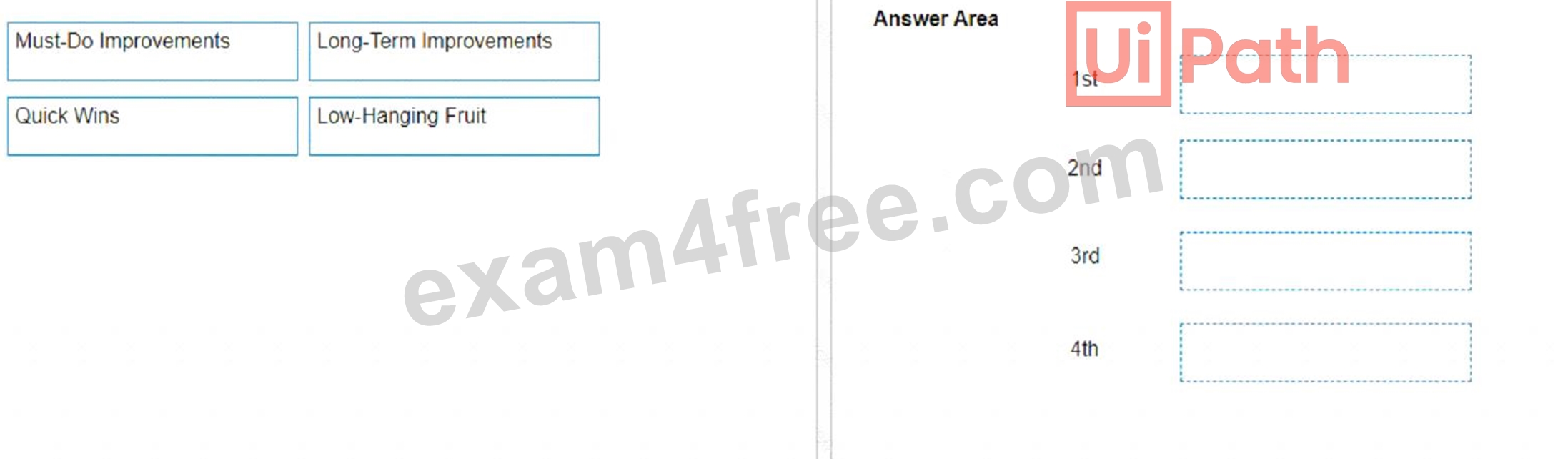
Answer:
Explanation: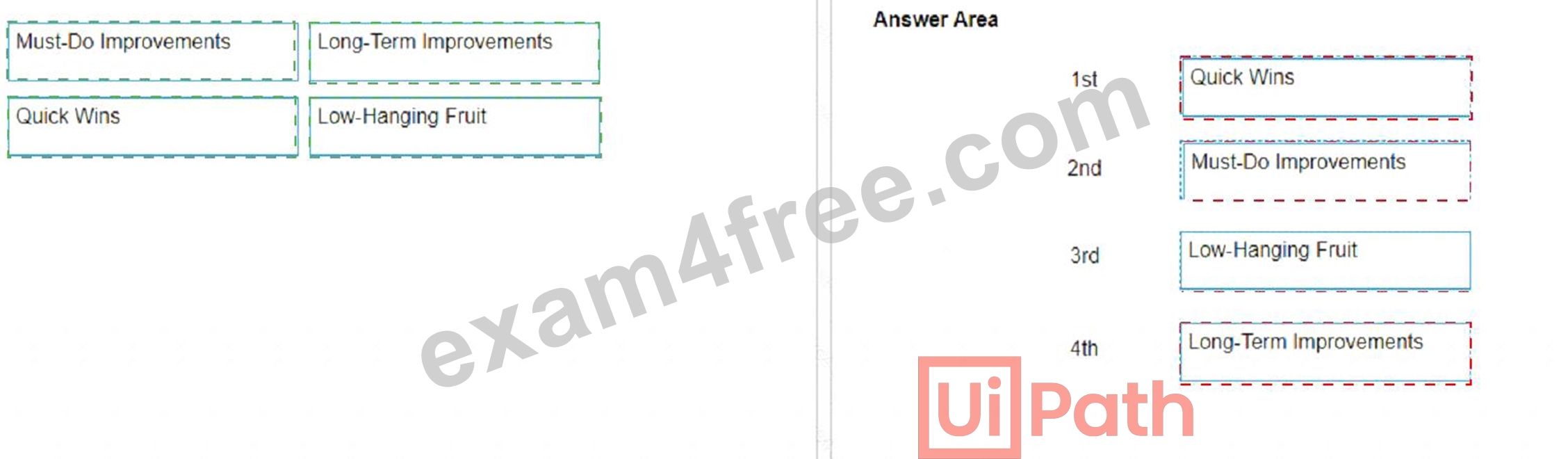
Explanation:
The correct order for prioritizing processes from a pipeline for development is:
* Quick Wins
* Must-Do Improvements
* Low-Hanging Fruit
* Long-Term Improvements
This prioritization strategy is designed to balance immediate impact with strategic development. Quick Wins are prioritized first because they typically require minimal effort and provide immediate benefits. Must-Do Improvements follow, as these are necessary changes that may require more effort but are essential for the processLow-Hanging Fruit are tasks that are relatively easy to implement and provide value, while Long-Term Improvements are placed last as they often involve significant changes that yield benefits over a longer period123.
References: The prioritization logic is based on common project management practices and is supported by discussions in the UiPath Community Forum, where similar strategies are recommended for process development and automation123.
NEW QUESTION # 53
In the PDD, what should a complete Out of Scope section contain?
- A. List out of scope process steps, reason and impact on the to Be process
- B. List of out of scope process steps
- C. List of out of scope process steps and inputs
- D. List of out of scope inputs & outputs
Answer: A
Explanation:
The Out of Scope section of a PDD (Process Definition Document) should include detailed information on processes or sub-processes that are not included in the scope of the RPA (Robotic Process Automation) project. This should not only list the out-of-scope steps but also provide the reasons why they are not included and the impact this exclusion has on the to-be process. Understanding and documenting what is out of scope is crucial for setting clear boundaries and expectations for the project, ensuring that all stakeholders have a common understanding of what the automation will and will not cover.References:https://docs.uipath.com/task-capture/standalone/2022.4/user-guide/details-about-the-pdd
NEW QUESTION # 54
......
UiPath UiPath-ABAv1 Exam Syllabus Topics:
| Topic | Details |
|---|---|
| Topic 1 |
|
| Topic 2 |
|
| Topic 3 |
|
| Topic 4 |
|
| Topic 5 |
|
| Topic 6 |
|
| Topic 7 |
|
| Topic 8 |
|
| Topic 9 |
|
| Topic 10 |
|
| Topic 11 |
|
| Topic 12 |
|
| Topic 13 |
|
| Topic 14 |
|
| Topic 15 |
|
| Topic 16 |
|
| Topic 17 |
|
| Topic 18 |
|
| Topic 19 |
|
UiPath Certified Professional Automation Business Analyst Professional v1.0 Free Update Certification Sample Questions: https://www.exam4free.com/UiPath-ABAv1-valid-dumps.html
Trend for UiPath UiPath-ABAv1 pdf dumps before actual exam: https://drive.google.com/open?id=1Bs0VCUmR86QQ0MJy1LANHCxz9_7CVclQ
